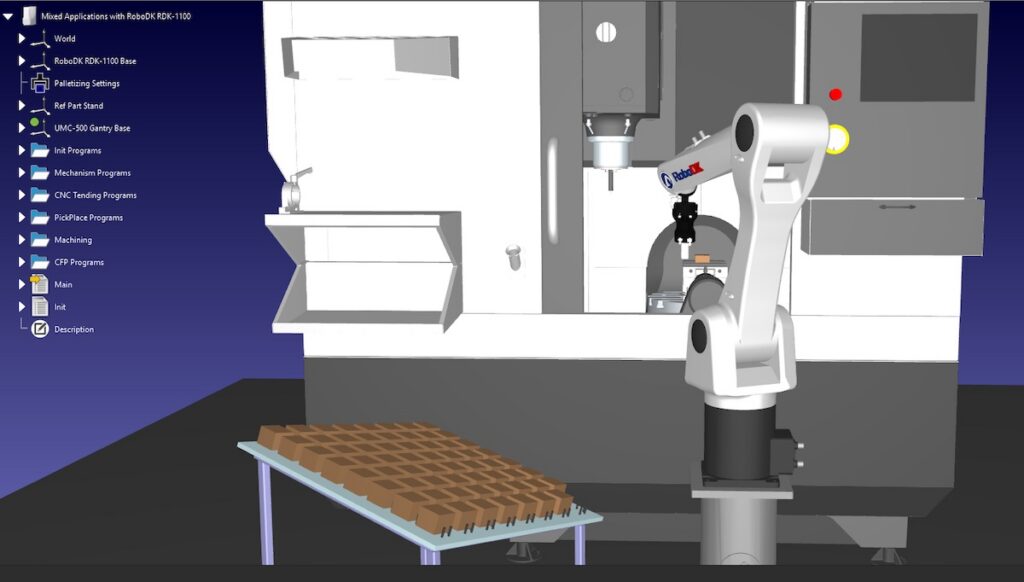
RoboDK is an example of digital twin and offline programming software. It allows users to test robots from more than 1,400 brands so they can find the best fits for their applications. Source: RoboDK
Manufacturers of all sizes know that automation can help solve labor challenges, increase throughput and quality, reduce waste, and improve consistency. But taking the first step can be daunting, especially for companies that are new to automation.
There are thousands of industrial robots available in many shapes and sizes and from many brands, along with thousands of end effectors and peripherals. These elements can be combined in an almost infinite number of ways. Knowing where to start can be a real challenge.
What robot size and peripherals are needed? How much floor space will the cell require? Will the throughput justify the investment? How well will it integrate with other machines? Is there a risk of getting locked into a single vendor? How long will a return on investment (ROI) take?
Global economic uncertainty and rising energy input costs are not helping much. Manufacturing sector sentiment and investor morale have dipped in several key markets, and many companies are placing greater scrutiny on new capital decisions.
But all this uncertainty does not have to mean standing still.
Digital twin software can help first-time automation buyers get unstuck. It allows manufacturers to compare robots and layouts, test peripherals, refine robot base positions, explore guarding layouts, model part flow, and consider operator access before committing capital.
Because they are dynamic, digital twins improve on the static drawings, CAD layouts, and spreadsheets that smaller companies often use to represent automation ideas.
Whether the concept is later handed to an integrator or implemented internally, digital twin software supports early automation exploration.
 Register now and save on your pass to RoboBusiness 2026
A digital twin can model robot functions
A digital twin is a virtual model of a robotic cell. It can include the robot, end-of-arm tooling, fixtures, conveyors, sensors, operators, and surrounding equipment.
Instead of relying only on sketches and assumptions, digital twin software shows how a robotic system will actually function.
For example, a digital twin can show whether the robot will reach all required positions. It can help test trajectories and toolpaths, estimate cycle times, identify collision risks, and evaluate operator access and maintenance clearance.
Some platforms also include application templates that provide a starting point for companies that know the task they want to automate but are unsure which robot, gripper, or layout fits best.
This experimentation can happen early, with no downtime and far less cost than trying multiple physical setups.
In this way, digital twins can turn vague ideas and stalled plans into more informed discussions. They allow manufacturers to explore automation without immediately committing to capital, a final layout, or a specific robot brand.
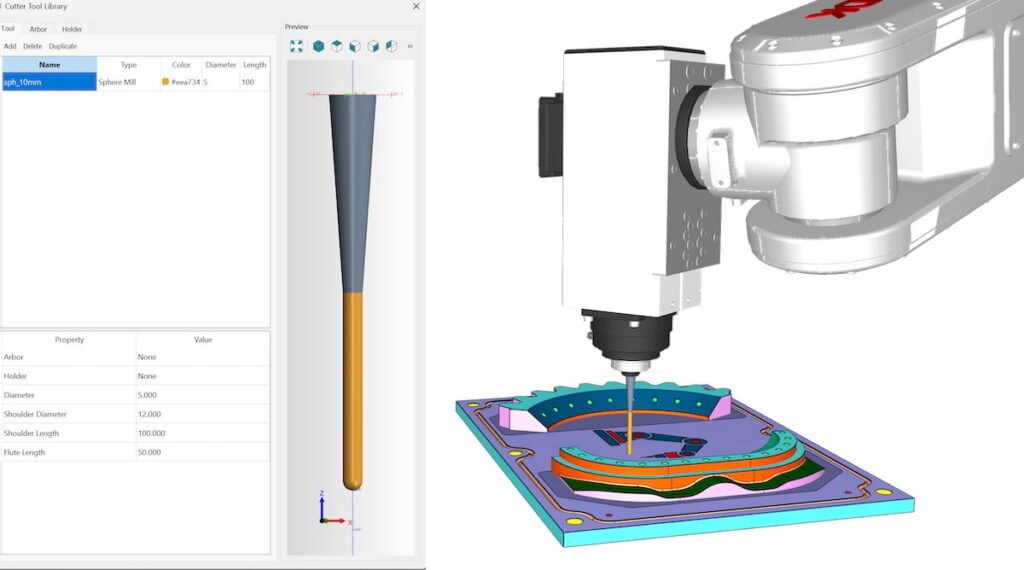
RoboDK digital twin and offline programming software can handle complex robotic machining applications with built-in CAM functionality. Credit: RoboDK
Simulation can reveal application details
Suppose a manufacturer is considering a robot for a CNC machine tending application to address labor shortages and improve quality and throughput.
The solution may look straightforward in brochures or online videos. A robot loads a part, waits for the machining cycle, unloads the finished part, and repeats the process. But once the actual setup is modeled in a digital twin, practical issues may appear.
The simulation might reveal that chuck cycles or part settling times create more idle time than expected. By importing CAD files and testing configurations, the manufacturer may discover that certain grippers struggle with the part geometry, or that a dual-grip design would improve the sequence.
Digital twins can also uncover layout constraints, collision risks, and safety or workflow issues. The same logic applies beyond machine tending. Digital twins can support applications from simple pick-and-place to welding, trimming, dispensing, inspection, palletizing, robotic machining, and teleoperation.
When digital twin software also provides offline programming and automatic code generation, it becomes a bridge between your initial automation idea, cell design, robot motion, and actual deployment.
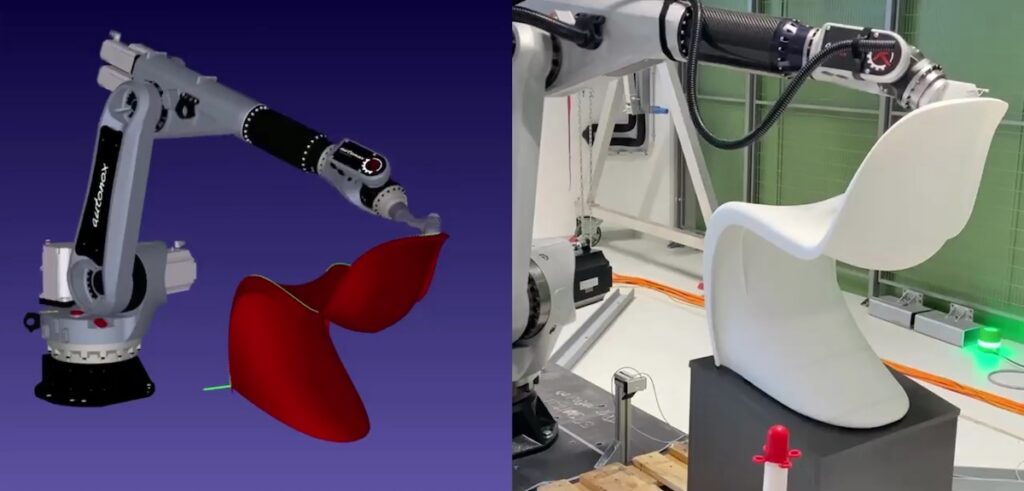
This side-by-side image shows how digital twin and offline programming software like RoboDK can provide highly accurate simulations (left) of real-world automation applications (right).Credit: RoboDK
What to look for in digital twin software
Digital twin software is not a single, uniform category.
If you are exploring automation for the first time, you may not know which robot brand, payload, reach, gripper, or layout will work best. A broad library of robots and peripherals, including end effectors, fixtures, conveyors, positioners, sensors, safety equipment, and surrounding machines, makes it easier to compare models and configurations. It also reduces the risk of vendor lock-in.
Manufacturers should look for tools that support collision checking, reachability analysis, robot calibration, offline programming, and automatic code generation.
If you’re interested in application-specific workflows such as CAM-based robotic machining, you will need digital twin software that provides motion planning and enables you to test machining robots and tooling based on CAD designs, generate toolpaths, simulate machining processes, detect collisions, and move from simpler three-axis tasks to more complex multi-axis machining.
Usability matters too. Enterprise digital twin platforms can be powerful, but they may be costly and difficult for companies exploring their first robotic cell. For first-time automation buyers, the best tool is the one that helps a team move quickly from uncertainty to a testable concept.
Improve conversations with integrators
Digital twins do not replace system integrators. They help companies investing in automation for the first time become more informed project partners.
In fact, many integrators already use digital twin and offline programming tools to develop concepts, compare robot brands, validate reachability, generate code, manage safety considerations, and present clearer proposals to customers.
When you have already explored layouts, constraints, target cycle times, robot options, and tooling ideas, you can start vendor discussions with clearer priorities and better questions. This improves quoting accuracy, shortens planning cycles, and reduces misunderstandings.
Manufacturers do not need an answer for every automation question before speaking to an integrator or vendor. But they do need a clearer starting point than a blank page, a static layout, or a preferred robot model.
In an environment where capital decisions are under greater scrutiny, digital twins can help manufacturers keep automation projects moving by encouraging companies to explore, test, and refine their ideas before committing to hardware, floor space, or a final system design.
In this way, digital twins are useful not only as simulation tools that can be used by experienced integrators and robotics experts, but also as practical decision-making and de-risking tools for manufacturers taking their first serious steps toward automation adoption.

About the author
Albert Nubiola is the founder and CEO of RoboDK, a leading software provider for industrial robot simulation and offline programming. With a deep technical background in robotic calibration and kinematics, Nubiola founded the company in 2015 as a spin-off from the CoRo laboratory at École de Technologie Supérieure (ÉTS).
Since then, the RoboDK platform has grown to support over 1,400 robot arms from 80 different manufacturers, making high-level automation accessible to businesses of all sizes. Nubiola is a frequent contributor to the robotics community, focusing on the intersection of software flexibility and manufacturing efficiency.
Tell Us What You Think!